- Catalogs
- SDC Verifier
- STRUCTURAL VERIFICATION ACCORDING TO STANDARDS

STRUCTURAL VERIFICATION ACCORDING TO STANDARDS
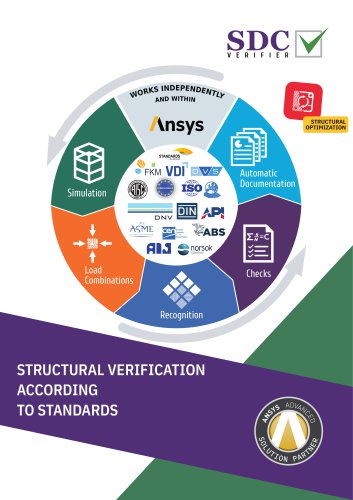
STRUCTURAL VERIFICATION ACCORDING TO STANDARDS
- Automatic Documentation Checks: SDC Verifier automates the verification process, making it easier to generate updated reports with design changes.
- Load Combinations and Simulation: The software supports complex engineering simulations and load combinations, ensuring comprehensive structural analysis.
- Design Optimization: The optimization module helps in making the best design decisions by calculating different combinations of design inputs, focusing on parameters like cross-section, weld type, yield stress, and plate thickness.
- Implemented Standards: SDC Verifier supports a wide range of standards including FKM, AIJ, ASME, ISO, Eurocode, and more, ensuring compliance with industry norms.
- Specific Loads Automation: The software automates the application of specific loads such as buoyancy, tank ballast, wind, wave, and current loads.
- Member and Joint Checks: Tools like the Beam Member Finder and Joint Finder automate the detection and verification of structural elements, significantly speeding up the verification process.
- Plate and Stiffener Buckling Checks: The software includes tools for automatic detection and checking of sections, panels, plates, stiffeners, and girders for buckling.
- Weld Recognition and Fatigue Checks: SDC Verifier automatically detects welds and performs strength and fatigue checks according to various standards.
- Report Generation: The software automates the report generation process, reducing time and effort in preparing detailed calculation reports.
- Post-Processing Tools: Tools like Peak Finder and Governing Loads help identify critical load cases and peak zones, optimizing the verification process.
- Customization: The checks in SDC Verifier are fully customizable, allowing users to create user-defined formulas and verification processes.
Catalog excerpts
STRUCTURAL OPTIMIZATION Automatic Documentation Load Combinations STRUCTURAL VERIFICATION ACCORDING TO STANDARDS
Open the catalog to page 1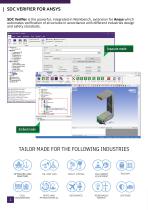
SDC VERIFIER FOR ANSYS SDC Verifier is the powerful, integrated in Workbench, extension for Ansys which automates verification of structures in accordance with different industries design and safety standards. Separate mode Embed mode TAILOR MADE FOR THE FOLLOWING INDUSTRIES HEAVY LIFTING MACHINERY EQUIPMENT CIVIL ENGINEERING RENEWABLE ENERGY
Open the catalog to page 2
Ansys offers an advanced engineering analysis environment for simulation of complex engineering problems. SDC Verifier together with Ansys makes the calculation procedure more transparent and facilitates checking of a complete set of load cases according to predefined design code rules or own standards. Full model description and all calculations are presented in reports. Consequences of updates to the design can be reviewed and compared with the original design using the report regeneration. The optimization module allows the best design decision to be made for the structure by calculating different...
Open the catalog to page 3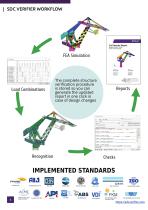
The complete structure verification procedure is stored so you can generate the updated report in one click in case of design changes Load Combinations ASME VIII (Div2, 2010) ASME B31.8-2018
Open the catalog to page 4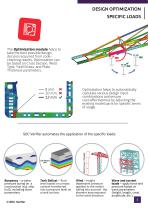
DESIGN OPTIMIZATION SPECIFIC LOADS The Optimization module helps to take the best possible design decision acquired from codechecking results. Optimization can be based on Cross Section, Weld Type, Yield Stress, and Plate Thickness parameters. Optimization helps to automatically calculate various design input combinations and ensure cost-effectiveness by adjusting the existing model parts for specific terms of usage. SDC Verifier automates the application of the specific loads: Buoyancy – a water pressure acting on a construction (e.g. ship hull), including wave parameters. © SDC Verifier Tank...
Open the catalog to page 5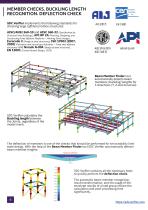
MEMBER CHECKS. BUCKLING LENGTH RECOGNITION. DEFLECTION CHECK SDC Verifier implements the following standards for checking large (offshore) lattice structures: AISC/ANSI 360-10 and AISC 360-22 (Specification for Structural Steel Buildings), API RP 2A (Planning, Designing, and Constructing Fixed Offshore Platforms — Working Stress Design), Eurocode 3 (Design of steel structures), ISO 19902 (2007, 2020) (Petroleum and natural gas industries — Fixed steel offshore structures) and Norsok N-004 (Design of steel structures), EN 13001 (Cranes General Design, 2018) Beam Member Finder tool automatically...
Open the catalog to page 6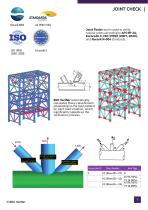
JOINT CHECK AS 3990 (1993) Joint Finder tool is used to verify tubular joints according to API RP 2A, Eurocode 3, ISO 19902 (2007, 2020), and Norsok N-004 standards. SDC Verifier automatically calculates Brace classification (depending on the load pattern) for each load situation, which significantly speeds up the verification process. Brace Number Joint Type #1 (ElemID = 27) K K (94.92%) #2 (ElemID = 13) TY (8.08%) K (94.92%) #3 (ElemID = 19) TY (8.08%)
Open the catalog to page 7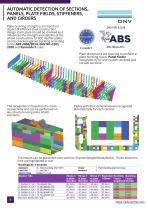
AUTOMATIC DETECTION OF SECTIONS, PANELS, PLATE FIELDS, STIFFENERS, AND GIRDERS Plate buckling strength is an important aspect of offshore steel construction design. Each plate should be checked as it influences the strength and stability of the whole construction. In SDC Verifier plates can be checked against buckling according to the ABS 2004/2014, DNV RP-C201 2010 and Eurocode 3 rules: Plate dimensions are required to perform a plate buckling check. Panel Finder recognizes X/Y/Z and custom (inclined and curved) sections: The recognition is based on the mesh connectivity and can be performed...
Open the catalog to page 8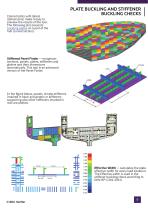
Colored plots with labels (dimensions) make it easy to preview the results of the tool. The following plot presents buckling plates on a part of the hull (curved section). PLATE BUCKLING AND STIFFENER BUCKLING CHECKS Stiffened Panel Finder — recognizes sections, panels, plates, stiffeners and girders and their dimensions automatically. This tool is an advanced version of the Panel Finder. In the figure below, panels, simple stiffeners (marked in blue) and girders or stiffeners supporting also other stiffeners (marked in red) are plotted. Effective Width — calculates the plate effective width...
Open the catalog to page 9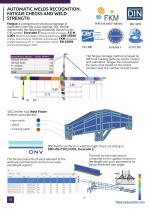
AUTOMATIC WELDS RECOGNITION. FATIGUE CHECKS AND WELD STRENGTH Fatigue is a progressive structural damage of materials under the cyclic loading. SDC Verifier implements the following standards (based on the S-N curves): Eurocode 3 (Design of steel structures), F.E.M 1.001 (Rules for the Design of Hoisting Appliances), DIN 15018 (Cranes. Steel structures. Verification and analyses), FKM (Analytical strength assessment (5th, 6th revised edition, 2003)), EN 13001 (Cranes General Design, 2018). Stress History, 20 years The fatigue damage method is based on different loading patterns (stress history)...
Open the catalog to page 10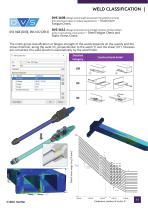
WELD CLASSIFICATION DVS 1608 (Design and strength assessment of welded structures from aluminum alloys in railway applications) – Aluminium Fatigue Check. DVS 1612 (Design and endurance strength analysis of steel welded joints in rail-vehicle construction) – Steel Fatigue Check and Static Stress Check. The notch group classification or fatigue strength of the welds depends on the quality and the stress direction, along the weld (X), perpendicular to the weld (Y) and the shear (XY). Stresses are converted into weld direction automatically by the weld finder.
Open the catalog to page 11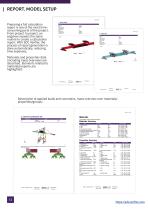
REPORT. MODEL SETUP Preparing a full calculation report is one of the most timeconsuming parts of the project. From project to project, an engineer repeats the same routine to create a calculation report. With SDC Verifier, the process of report generation is done automatically, reducing time expenses. Materials and properties data (including mass overview) are described. Elements related to material/property are highlighted: Description of applied loads and constrains, mass overview over materials/ properties/groups: Gravity Center Gravity Center NB: Constrain in Y direction are applied to the...
Open the catalog to page 12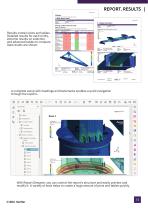
REPORT. RESULTS Results contain plots and tables. Detailed results for each entity, extreme results on selection, and advanced tables to compare load results are shown: A complete setup with headings and bookmarks enables a quick navigation through the reports. With Report Designer, you can control the report's structure and easily preview and modify it. A variety of tools helps to create a huge amount of plots and tables quickly.
Open the catalog to page 13All SDC Verifier catalogs and brochures
 SIMULATION FIRST
5 Pages
 SDC Reporting
8 Pages
 COMPANY PROFILE
13 Pages