- Catalogs
- SDC Verifier
- SDC Reporting

SDC Reporting
SDC Reporting
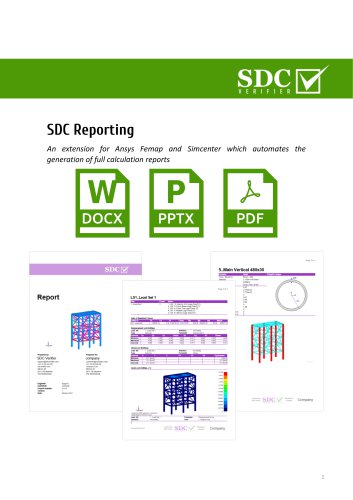
SDC Reporting is an extension designed for CAE programs like Ansys Femap and Simcenter, aimed at automating the generation of comprehensive calculation reports. It integrates with SDC Verifier software to enhance documentation and presentation capabilities.
Report Designer & Presentation Designer
The Report Designer facilitates the creation of detailed FEA model documentation and calculation reports in Docx and PDF formats. The Presentation Designer allows for the quick generation of PowerPoint presentations summarizing key results.
Report Structure & Navigation
The report structure is organized into Microsoft Word and PDF bookmarks, enhancing navigation. Results can be sorted by loads or selections such as frames and decks.
Model Description
The tool automatically describes materials and properties, including mass overview, and highlights elements related to these properties. Boundary conditions and applied loads are also automated.
Model Checks
Mesh quality is assessed using eight criteria, and issues like lost connections due to incompatible meshing are identified. A comprehensive mass overview is provided for various selections.
Tables
The tool offers extensive table options to summarize calculation results, such as reaction forces and extreme results like maximum stress. Table formats can be customized for different result categories.
Post-processing Tools
The Peak Finder identifies peak zones based on user criteria, while the Governing Loads tool extracts critical loads from numerous combinations, reducing them significantly.
Report Template
Users can configure report templates, including layout, headers, footers, fonts, and margins. Custom fields and project information can be incorporated into the report layout.
Catalog excerpts
SDC Reporting An extension for Ansys Femap and Simcenter which automates the generation of full calculation reports
Open the catalog to page 1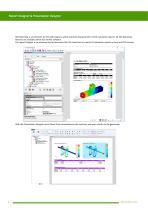
Report Designer & Presentation Designer SDC Reporting is an extension for the CAE programs which automate the generation of full calculation reports. All SDC Reporting features are available within SDC Verifier software. The report Designer is an advanced tool to document the FEA model and to create full calculation reports in Docx and PDF formats. With the Presentation Designer quick Power Point presentations with summary and main results can be generated:
Open the catalog to page 2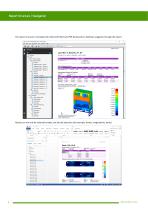
Report Structure / Navigation The report structure is translated into Microsoft Word and PDF bookmarks to facilitate navigation through the report. Results can not only be ordered by loads, but also by selections (for example, frames, longitudinals, decks).
Open the catalog to page 3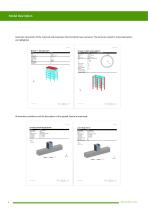
Model Description Automatic description of the materials and properties data (including mass overview). The elements related to material/property are highlighted. All boundary conditions and the description of the applied loads are automized.
Open the catalog to page 4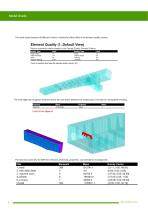
Model Checks The mesh quality based on 8 different criteria is checked and described in the element quality section. The Free Edge tool recognizes locations where the connection between the model parts is lost due to incompatible meshing. The total mass overview for different selections (materials, properties, user selections) including COG.
Open the catalog to page 5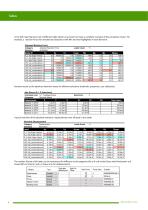
In the SDC reporting tool a lot of different table options are present to make a complete overview of the calculation results. For example, a reaction forces for selected load situations with Min and max highlighted in each direction. Extreme results as the absolute maximum stress for different selections (materials, properties, user selections). A quick overview of the absolute maximum displacements over all loads in one table: The number format of all tables can be customized for different result categories (for a SI unit model Stress with fixed power e+6 shows MPa or N/mm2 and e-3 shows mm...
Open the catalog to page 6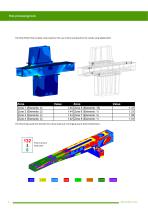
Post-processing tools The Peak Finder finds all peak zones based on the user criteria and presents the results using labeled plot: The Governing Loads tool extracts the critical loads out of a large group of load combinations: From 132 to 8 load cases
Open the catalog to page 7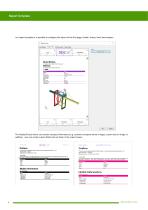
Report Template In a report template it is possible to configure the layout of the first page, header, footer, fonts and margins: The Header/Footer items can contain a project information (e.g. customer company name or logo), custom text or image. In addition, user can create custom fields and use them in the report layout.
Open the catalog to page 8All SDC Verifier catalogs and brochures
 SIMULATION FIRST
5 Pages
 COMPANY PROFILE
13 Pages